
 US
US UK
UK CH
CH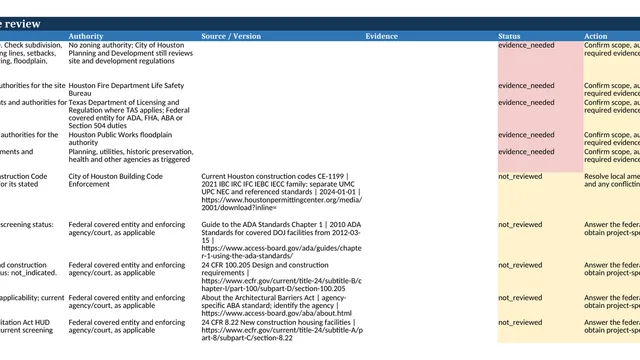
RFIs, changes and pay apps. In order.
ArchX keeps your RFI, submittal and change logs from the actual records, drafts the outgoing response for your review and checks every pay application against the contract: approved change orders in, pending changes out, retainage at the rate in your agreement.
Give it the files. Get the result.
You provide
The executed agreement and general conditions, the contractor’s pay application with its schedule of values, your logs and the incoming RFIs and submittals.
ArchX delivers
- Construction administration register in Excel, one sheet per record type
- Outgoing draft in Word for your review and signature
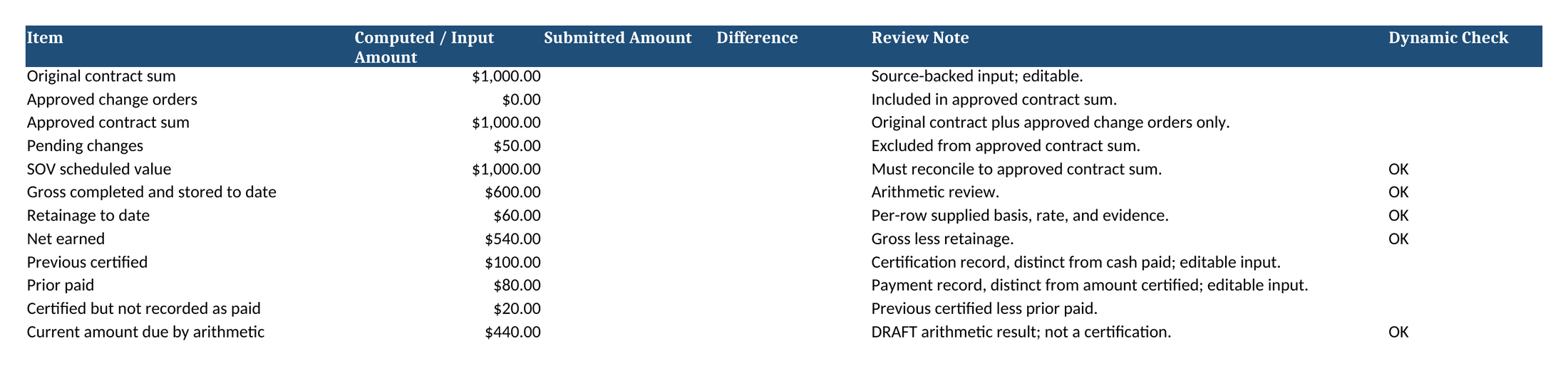
- Pay application review: schedule of values, retainage, overbilling flagged
What ArchX does.
- 01Reads the agreement, the logs and the incoming records
- 02Updates the register and checks every pay application line
- 03Drafts the response and the review for your signature
ArchX drafts. You certify.
The pay application review is a working draft, not a certificate and not an AIA form. Sending, approving and certifying stay with the person your contract names.
The file ArchX wrote.
A pay application checked line by line: the approved contract sum with a pending change kept outside, 10% retainage on work completed and stored, and the current amount due by arithmetic.
The other U.S. workflows.
Codes and permits
The code in force on your filing date.
AHJ, code editions, permit matrix
Dimensions and quantities
Feet and inches. Exact to the fraction.
Feet and inches, conversions, takeoffs
Costs and bids
Every bid on the same basis.
Bid leveling and cost review in USD
Phases and specifications
Every deliverable. Every spec section.
Phase deliverables, project manual, submittals
See it on a project like yours.
Try ArchX free for 7 days on your own project, or watch it work in a 20-minute demo.
7 days free · No payment details · Mac and Windows