
 UK
UK CH
CHWhat is an AI agent in an architecture practice?
An AI agent is AI that does the work instead of describing it. You give it a task and the project files. It opens the drawings and documents itself, works through every step and saves the finished result in your project folder: a tender analysis, a validation check, a client letter. A chat answers questions. An agent delivers files. Your practice checks them and signs.
On this page
Most practices have tried a chat by now: paste in a question, get an answer, do the work yourself. An AI agent changes the last part. It takes the task and the files and comes back with the work done.
What makes an agent different from a chat?
OpenAI, the company behind ChatGPT, defines it in one sentence in its guide to building agents:
“Agents are systems that independently accomplish tasks on your behalf.”
By that definition a simple chatbot that answers one prompt at a time is not an agent. An agent runs the workflow itself: it decides the next step, uses tools to read files and take actions, recognises when the job is done and, if something fails, stops and hands control back to you.
| A chat | An AI agent | |
|---|---|---|
| Input | What you paste or upload | The files in your project folder, which it opens itself |
| Work | One answer to one question | Many steps: sort, read, measure, compare, calculate, check |
| Result | Text in a window that you rework | An Excel analysis, a Word letter, a PDF report, a DXF drawing |
| Control | You check the answer | You see every step and check the result |
So ask any AI tool where it works and with what. ArchX works on your computer, in your project folder, with tools built for architecture practice: it measures in PDF drawings, reads scanned pages with text recognition, writes Excel workbooks with working formulas, Word documents on A4 and DXF drawings. What the agent reads for a task goes to the AI provider your practice has chosen.
What does that look like on a tender?
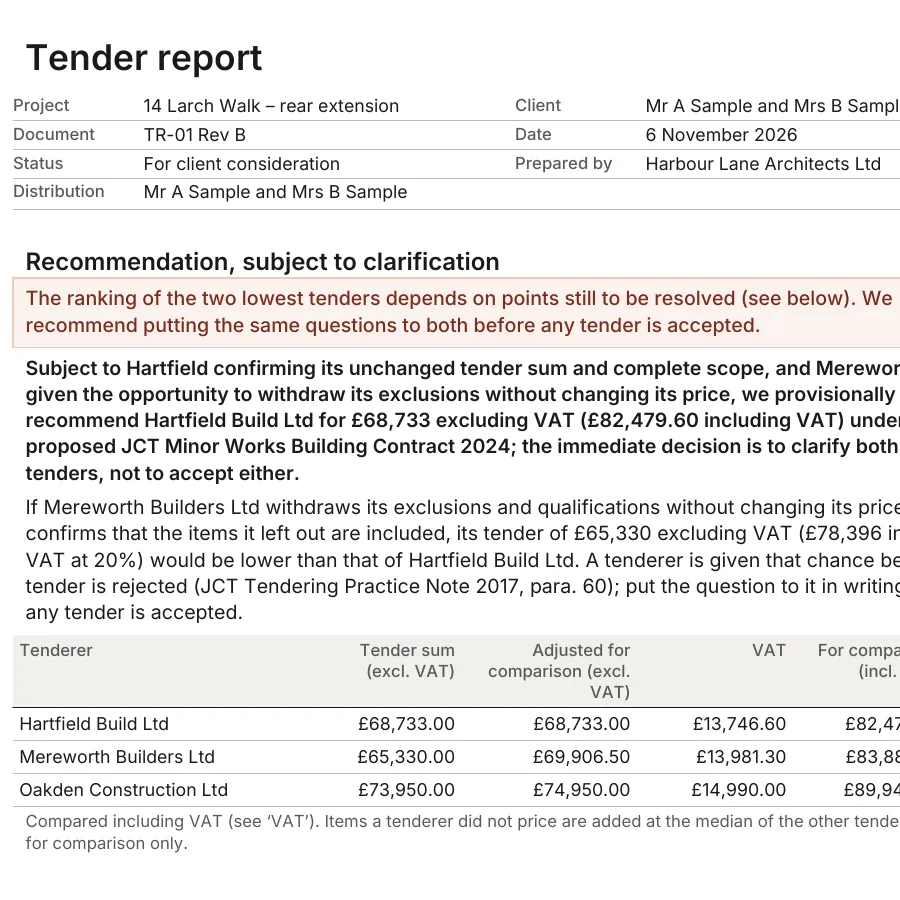
Take a job every practice knows: three tenders back for a rear extension, each priced on its own terms, with its own exclusions and qualifications. On an England test project, the task for the ArchX UK edition was to check the returned tenders and write the tender report.
ArchX read the tenders and the tender conditions, recalculated the totals, priced the exclusions and qualifications, ranked the tenders as submitted and as adjusted, and wrote a tender analysis in Excel and a seven-page tender report with a recommendation and the questions to put to the contractors.
How accurate is that? We measured it on a Swiss test project with five contractor tenders and 13 planted pricing traps. ArchX found all 13, with no false alarms. All 212 item prices in the comparison and all 214 page references were correct, and the Excel workbook carried 1,454 formulas without a single deviation. Time to the finished comparison: 14 min 42 s.
Can an agent check a whole project folder?
The second example is bigger: the whole folder of a Swiss test project, 20 files in seven folders. Contract, drawings with title blocks and revisions, the planning application with its list of enclosures, a cost estimate, two sets of minutes and two quotes, as PDF, Word and Excel. We planted eight problems and wrote down beforehand what would count as found. Among them:
- a facade material that differs between the specification and the elevations,
- a drawing register listing revision C while the folder holds revision B,
- an action from the first meeting that disappears from the next minutes without being closed,
- an energy statement listed as enclosed but missing from the folder.
Seven of the eight sit between documents, not in any single one. After 11 min 32 s ArchX delivered a ten-page review report with 14 findings and a one-page project summary, each finding referenced to the page, paragraph or Excel cell. All eight planted problems were among them, and none of the six further findings was unfounded. The original files were unchanged.
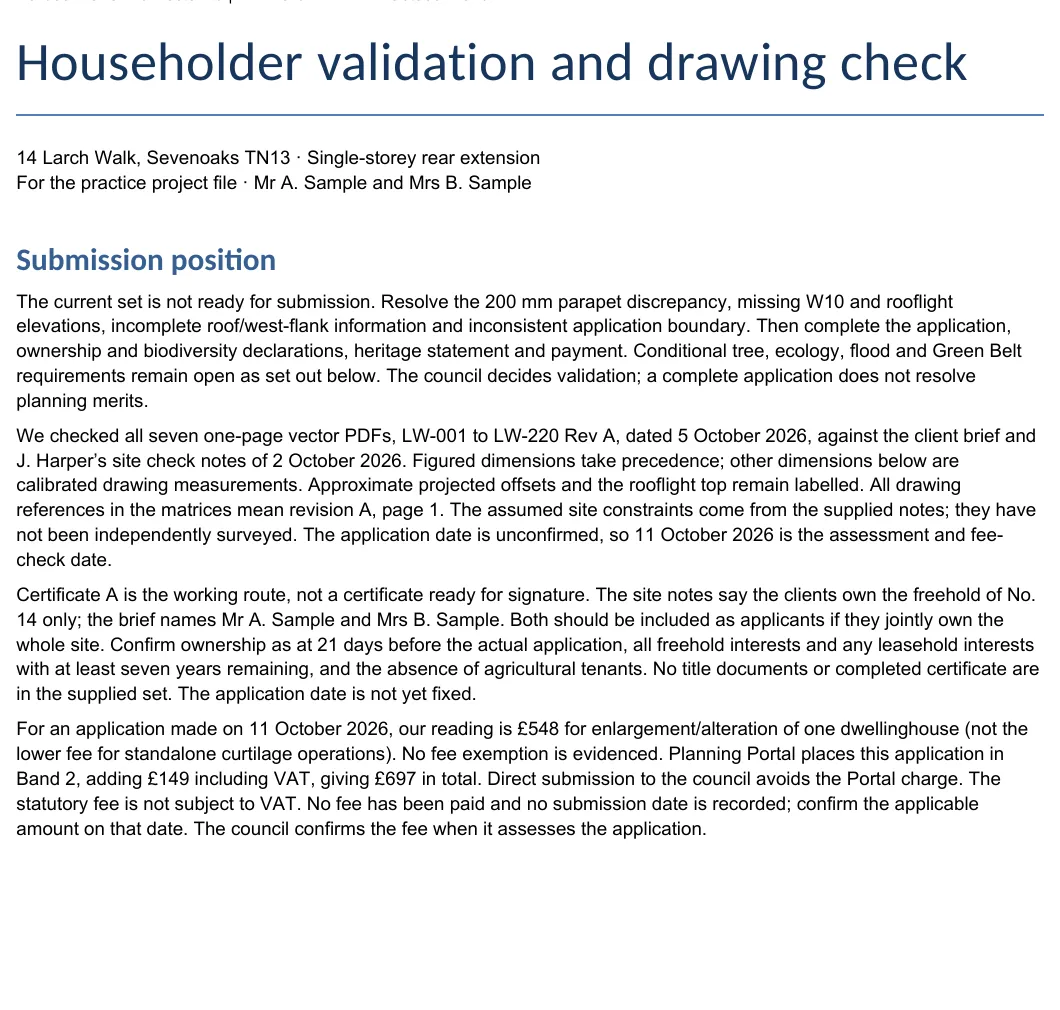
The UK edition does the same before a planning application in England. On an England test project it checked seven application drawings against the council’s validation requirements and the client brief, and wrote a householder validation check with the application fee, a permitted development assessment, the floor areas and a draft heritage statement.
What does the agent do, and what stays with you?
- You give the task in your own words and choose the project folder.
- The agent looks at what is there and plans the work.
- The agent reads the documents: PDF, Word, Excel, drawings and IFC models, and scanned pages, whose text it recognises on your computer.
- The agent works through the steps: it measures, calculates, compares and checks.
- The agent asks, or marks its assumption, where no document gives the answer. What it could not establish stays visible as open.
- The agent saves the result as Excel, Word, PDF or DXF in the ‘Results’ folder of your project. Your originals stay unchanged.
- You check, correct in the conversation and sign.
The last step is where your practice earns its fee. ArchX’s licence terms require a named, suitably qualified person in your practice to check every result before it is used or issued and to take professional responsibility for it. The ARB Architects Code 2025 says nothing specific about AI, but two of its examples fit: architects assure themselves of the competence of anyone they engage to work on their behalf (3.4), and they keep accurate records of their work and decisions (4.5). An agent that cites its sources and shows every step makes both easier.
How do you stay in control?
While it works, ArchX shows every step. You can add to a running task, correct it or stop it. How much it may do on its own, you set under ‘Settings’ → ‘Files and access’:
- ‘Approve for me’, the default: network access and access outside the project folder need an approval, and an AI review decides on each request. Refusals stay visible.
- ‘Ask for approval’: every such request comes to you as a card, and you decide.
- ‘Full access’: no approvals. The header shows a warning icon while it is on.
Your files stay in your project folder. What the agent reads for a task goes directly from your computer to the AI provider your practice has chosen: to OpenAI through your ChatGPT account, or to the provider of your API key. Project content never goes to FrontierX on its own; it reaches us only if you send it with a support request. The details are in AI and data protection in UK architecture practices.
What does it mean for a practice in England?
AI is already in most UK practices. In the RIBA AI Report 2026, 74% of practices use AI on at least some projects, up from 59% in 2025 and 41% in 2024. 31% use it on all or most projects; in 2024 it was 6%. Among the practices that use AI, the most common uses are early-stage design visualisation (56%), regulation and compliance checking (40%) and practice management (32%).
Agents take AI from pictures and answers into the production work that fills the week: tender analyses, validation checks, Building Regulations letters, site visit reports and drawing registers. The ArchX UK edition writes in British English on A4 and works with the rules for projects in England: planning, Building Regulations and contract administration under JCT Minor Works 2024.
Only 19% of practices have a written AI policy. Write yours on one page: which tools, which documents, who checks. The regulator is paying attention as well: on 8 October 2026 the ICO said its scrutiny of AI developers now extends to AI agents.
Then start with one task from a live project: the tenders on your desk, the drawing set before issue, the notes from yesterday’s site visit.
Frequently asked questions
Is ArchX the same as ChatGPT?
No. ChatGPT is a chat. ArchX is an AI agent on your Mac or Windows computer. It works with your ChatGPT account or an API key from OpenAI, Anthropic, Google, Mistral or xAI, and adds what an architecture practice needs: measuring in PDF drawings, Excel with working formulas, DXF drawings, and the UK edition’s workflows for planning, Building Regulations, tendering and contract administration.
Do I need to know how to code?
No. You write the task in your own words, as you would brief a colleague: for example, compare these three tenders and write the tender report for the client. Where a document does not give the answer, ArchX asks or marks its assumption.
Who is responsible for what the agent produces?
Your practice. ArchX’s licence terms require a named, suitably qualified person acting for your practice to check every result before it is used, passed on, issued for tender or submitted, and to take professional responsibility for it.
Which files can ArchX work with?
PDF, Word, Excel and PowerPoint, drawings and IFC models, and scanned pages, whose legible text it reads with text recognition on your computer. It writes Word, Excel, PowerPoint and PDF files that stay editable, and DXF drawings. DWG files need exporting from your CAD program first.
Sources
Sources
- A practical guide to building agents, OpenAI, 7 April 2025. Retrieved 12 October 2026.
- RIBA AI Report 2026, Royal Institute of British Architects (RIBA), July 2026. Retrieved 12 October 2026.
- The Architects Code: Standards of professional conduct and practice 2025, Architects Registration Board (ARB), in force since 1 September 2025. Retrieved 12 October 2026.
- ArchX Licence Terms (United Kingdom), sections 15 and 16, TYTOS GmbH, 12 October 2026. Retrieved 12 October 2026.
- ArchX Privacy Notice (United Kingdom), section 3, TYTOS GmbH, 12 October 2026. Retrieved 12 October 2026.
- ICO secures changes from leading AI developers as scrutiny extends to AI agents, Information Commissioner’s Office (ICO), 8 October 2026. Retrieved 12 October 2026.