
 UK
UK US
US CH
CHAI agent at work · Site records / United Kingdom
Cavity tray not visible. A clear action before concealment.
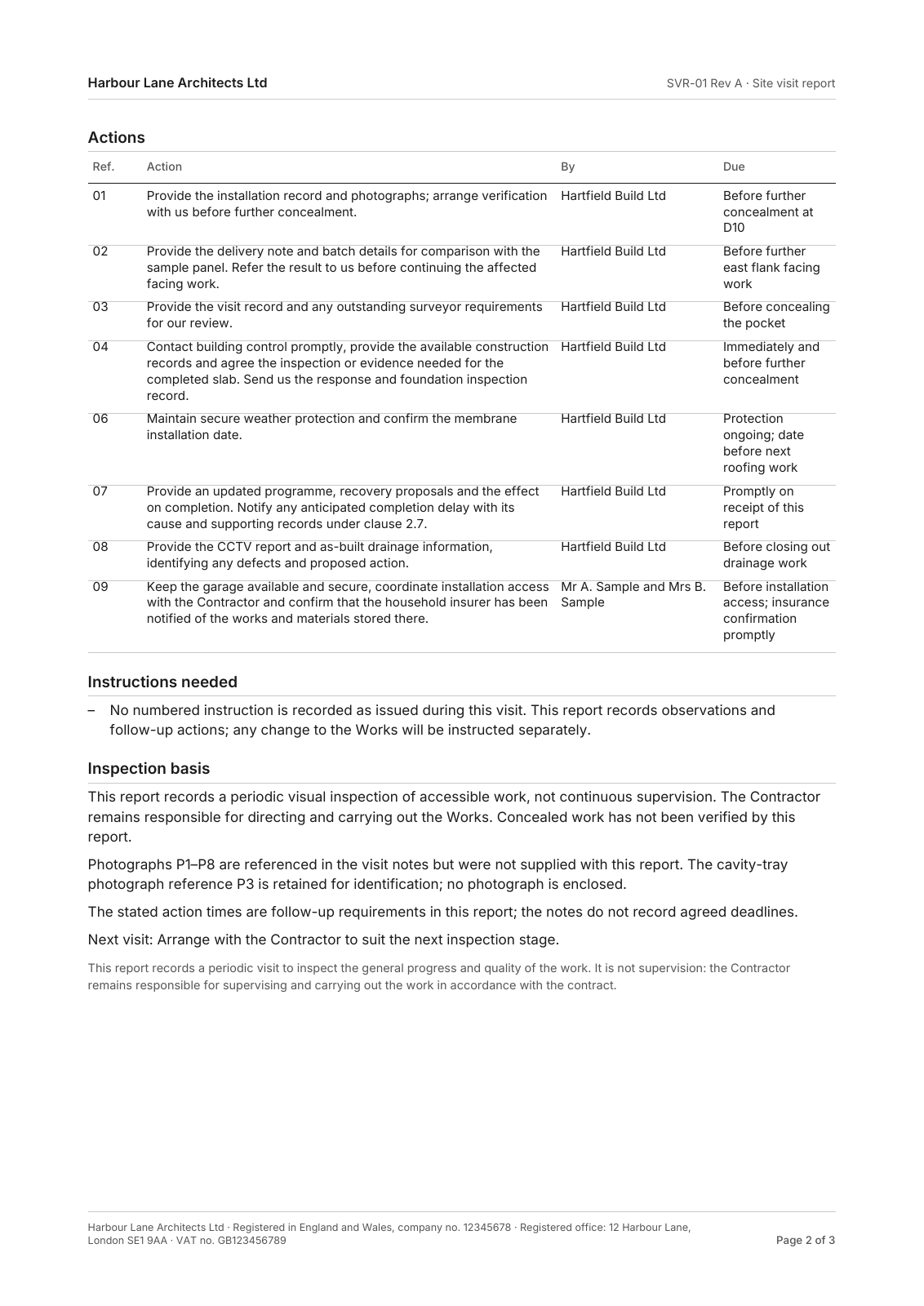
ArchX turned site observations into a Word and PDF report with named actions, including installation evidence to obtain before further work conceals it.
Inside the original output
| Observed issue | Required follow-up | Due point |
|---|---|---|
| Cavity tray not visible | Contractor: installation record, photos and verification | Before further concealment at D10 |
| Slab complete; inspection not booked | Contractor: contact building control and provide records | Immediately; before further concealment |
| Drainage CCTV reported complete | Contractor: provide CCTV report and as-built information | Before drainage closeout |
Three actions from the original report. These are the report’s follow-up requirements; the notes do not establish agreed deadlines. An unseen tray is not declared missing.
What you can do with it
Use the editable Word report to follow up installation evidence and inspections with the contractor. Each action stays tied to the observation that prompted it.
The deliverable
Open what ArchX produced.
Original files from this run. No sign-up.
The visit date is part of the fictitious scenario. The report was generated in the recorded October test run; no real December inspection is implied.
The starting point
What ArchX received.
Read the original request and file list
The request
First, my site visit on 14 December 2026 (notes in Site/): please write it up as a site visit report with actions for the contractor and the clients. Then the clients’ email about a third rooflight: draft the instruction to the contractor and tell me what else changes because of it.
The project files
- Site visit 2026-12-14 notes.txt
- Contract particulars (summary).txt
- Project drawing PDFs
Try it on a job you know
Give it the task.
Then keep going.
Describe the work in your own words. Start with a project you know, inspect the result and ask for the next change in the same conversation.
Bring these files
Site notes, visit details and the relevant project drawings or contract particulars.
What to check
Trace one observation to your notes. Is the action clear, and has the report avoided asserting anything you did not observe?
Before using client files, review how ArchX handles project data.
What could you ask next?
A suggested follow-up, once you have reviewed the result and added the new files:
The contractor has replied and the new site notes are in the folder. Update the action list and draft the next site report, carrying unresolved items forward.
Download for Mac or Windows, connect your ChatGPT account or API key, then give ArchX this request with your files. AI usage runs through your connected account. Pricing and account requirements.