
Takeoff from an IFC model.
Every value with its source.
Take quantities from an IFC model you can check: base quantities, what exports leave out, and a test takeoff in square feet with a source on every line.
How do you do a quantity takeoff from an IFC file?
Read the quantities from the model’s geometry and keep the element with each value: room areas from the space footprints, gross area from the slab, wall faces from length times height, doors and windows by count and size. Then compare with the drawing and take from the sheet what the model does not hold, such as an open porch, and say which source each value comes from. Before you trust a model quantity, look at what the export really contains.
Why quantities go missing
A model quantity can only be as good as the export. Quantities go missing or turn out wrong for these reasons, so check each of them:
- Whether the file carries base quantities (the Qto sets) or only geometry to calculate from.
- Units and scale: a wall height out by a factor of 1,000 makes every wall area useless.
- What is modeled at all: in the example, the open porch was not in the file.
- Whether positions match the drawing: compare doors and windows with the sheet.
One file from Revit, Vectorworks or Archicad
For this file-based task, ArchX reads the IFC and PDF sheets those programs export, with no extension required. It does not read DWG: save a DXF or print a PDF. In Archicad, it can also work live in the open model, through a free add-on it sets up. From ArchX 0.1.13 it also works directly in Revit on Windows and Vectorworks on Windows, with Vectorworks on Mac available as a beta. Vectorworks capabilities depend on your edition.
How to do it.
- 01
Export the IFC
Put it in the project folder with the PDF sheet.
- 02
Say what you need
Rooms, gross area, walls, doors, windows, in the units you bill in.
- 03
ArchX reads and measures
From the model, and from the PDF where the model does not have it.
- 04
Check the sources
Each line names its element or sheet, with a drawing index if you asked for one.
A test file: a small cottage in square feet.
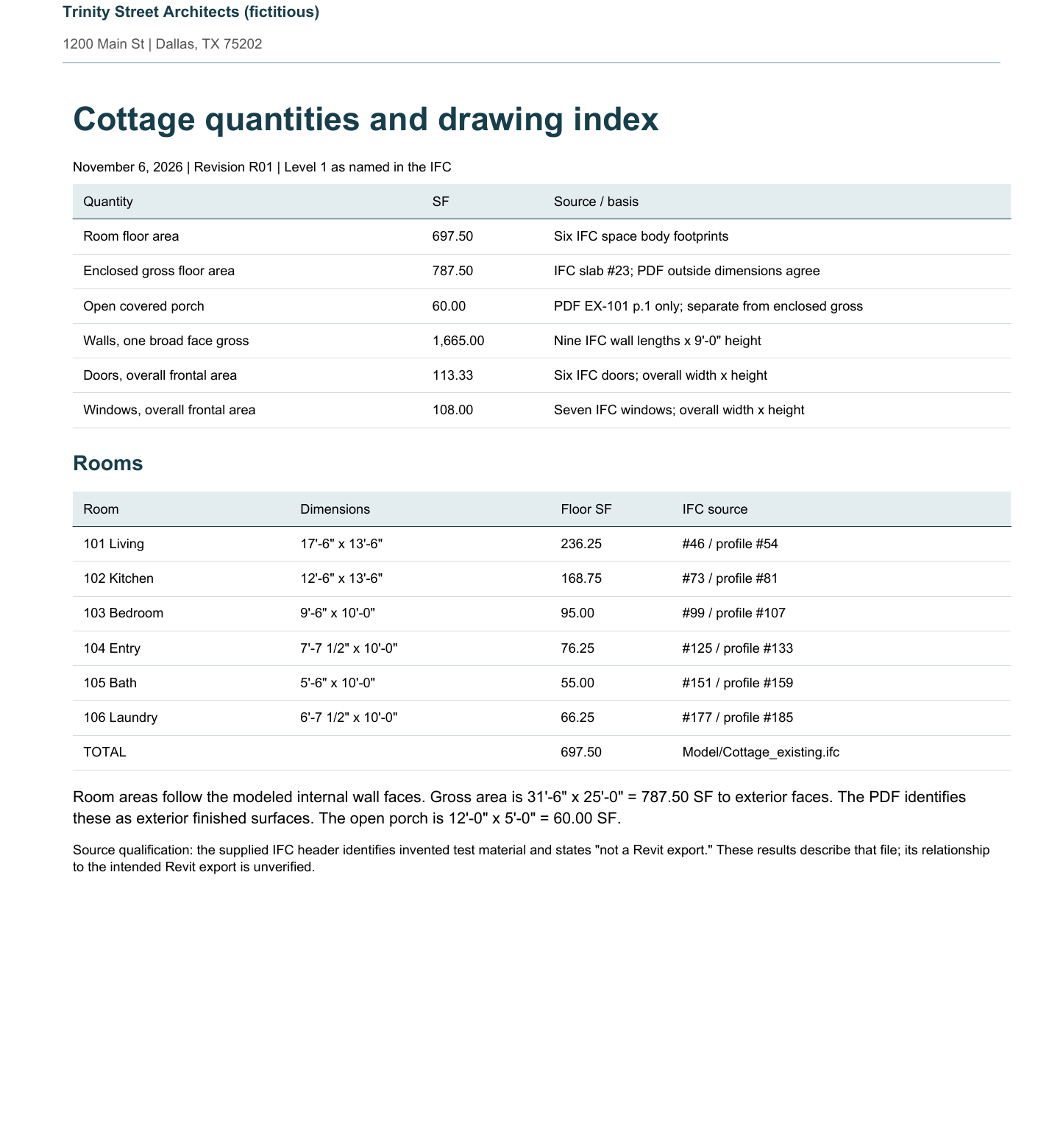
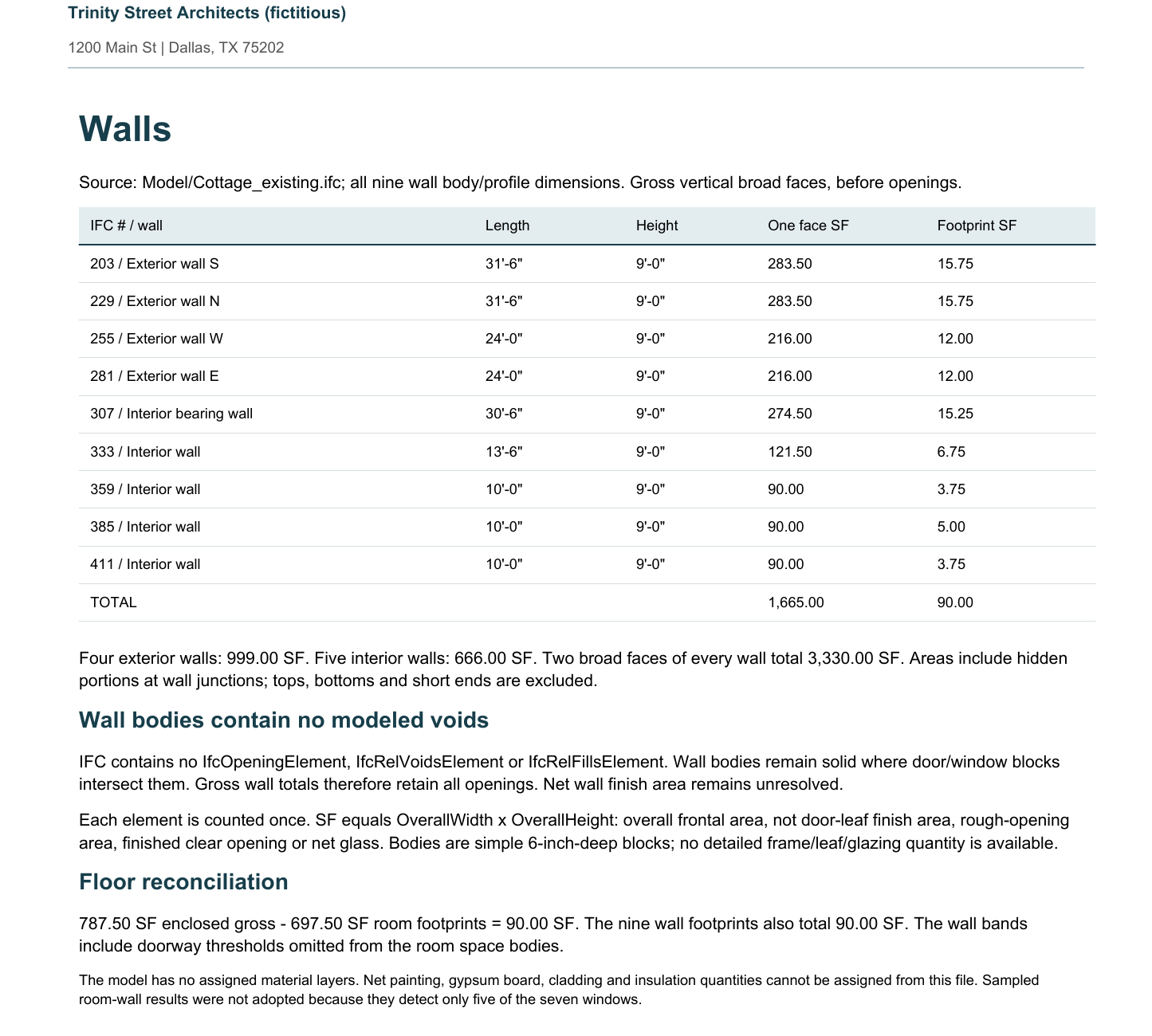
Our test IFC was written like a default model export, and it is labeled as a test file: ArchX said so in its answer and stated that the values describe that file. It delivered the schedule in square feet with a source on every line, plus a sheet index.
ArchX working time, measured
enclosed gross floor area: IFC slab and PDF outside dimensions agree
open porch, missing from the model and taken from the PDF sheet
Test project: an invented test IFC and PDF sheet of a fictitious cottage for “Trinity Street Architects (fictitious)”. One run of November 6, 2026 with ChatGPT Pro (GPT 6.1 Sol, very high) and the same code as ArchX 0.1.3. More quantities results
Asked briefly.
Does ArchX work with an IFC from Revit?
ArchX reads IFC files. This example is an invented test file, not a Revit export; ArchX reports what the file contains, including what is missing or does not fit. Try it on your own export.
Which units does it use?
For U.S. firms square feet and feet and inches, on Letter size in U.S. English.
Can I edit the result?
Yes. The schedule comes as an Excel workbook and a PDF in your project folder.
Try it on your own work.
Download ArchX for Mac or Windows and give it a task from your firm. 7 days free with your ChatGPT account (Plus or higher).