
Schedule of values.
What the architect checks.
What a schedule of values is, what the architect checks before using it, how each continuation sheet builds on it, and a free Excel template with checks.
What is a schedule of values?
A schedule of values divides the contract sum into portions of the work and gives each a dollar value. The contractor prepares it. Under AIA A201-2017 §9.2, on a stipulated sum or GMP contract, the contractor submits it to the architect before the first application for payment, in the form and with the supporting data the architect requires, and every application is then reviewed against it. Before you rely on it, check that the lines add up to the contract sum, that early work is not valued above its worth, that each line is small enough to judge in the field, and that change orders come in as lines of their own. Under another form of agreement, check what that agreement requires.
What a schedule of values is
A schedule of values is a table with one line for each portion of the work: an item number, a description and a scheduled value. Together the lines allocate the entire contract sum. According to AIA’s instructions, the breakdown may be by sections of the work or by subcontractors. AIA does not publish a standard schedule of values form; its G703 continuation sheet is often used to record it.
The contractor prepares it. AIA A201-2017 §9.2 asks for it where the contract is based on a stipulated sum or a guaranteed maximum price: the contractor submits it to the architect before the first application for payment, in the form and with the supporting data the architect requires. It is then the basis for reviewing each application. Changes to it also go to the architect, with the data the architect asks for. On a cost of the work contract without a GMP, or under another form of agreement, the agreement says what is required.
What to check before the first pay application
Check the schedule when it comes in, not when the first application does. Six points decide whether it will carry you through the job:
- The total. The scheduled values add up to the contract sum in the agreement, to the cent. AIA’s G703 instructions say the total of the scheduled values should initially equal the original contract sum.
- Front-loading. Early work valued above its worth pays the contractor ahead of progress. Compare lines such as bonds, mobilization, sitework and foundations with the bid breakdown or your own estimate, and ask for the backup where a value looks high.
- Lines too coarse to judge. A single line for mechanical or for the building shell runs for months, and on a site visit you cannot tell 40 percent from 60 percent. Ask for lines you can verify in the field.
- General conditions, overhead and fee. AIA describes general conditions costs as the indirect, project-specific costs of running the job, such as field supervision, temporary facilities, cleanup and mobilization, separate from home office overhead and the contractor’s fee. The contract decides who pays for each. Ask how general conditions and the fee are billed over time: a general conditions line billed mostly in the first months is front-loading by another name.
- Stored materials. Where materials are bought long before they are installed, such as equipment or storefront, the lines should let you tell stored from installed. Whether stored materials are paid for, on what conditions, and whether retainage applies to them is set by the agreement.
- Change orders. They come in as lines of their own, not folded into an original line. AIA’s G703 instructions say change orders are usually listed separately, on their own continuation sheet or at the end of the basic schedule, and AIA’s payment tips say to bill only approved ones.
How each continuation sheet builds on it
The schedule of values becomes the first three columns of every continuation sheet: item, description of work and scheduled value. Each application adds the billing: work completed from previous applications, work completed this period, materials presently stored, the total completed and stored, the percent and the balance to finish. AIA’s G703 instructions work it out line by line. The total is previous plus this period plus stored, the percent is the total divided by the scheduled value, and the balance to finish is the scheduled value less the total. A retainage column by line is normally used only where the contract lets retainage vary by line.
| Item | Description of work | Scheduled value | Previous applications | This period | Materials stored | Total completed and stored | Percent | Balance to finish |
|---|---|---|---|---|---|---|---|---|
| 2 | Bonds and insurance | $18,500 | $18,500 | $1,200 | $0 | $19,700 | 106.5% | -$1,200 |
| 9 | Roofing | $68,000 | $0 | $20,400 | $14,000 | $34,400 | 50.6% | $33,600 |
| 17 | HVAC | $118,000 | $17,700 | $11,800 | $31,500 | $61,000 | 51.7% | $57,000 |
Line 2 is billed over 100 percent: $1,200 more than its scheduled value, so its balance to finish turns negative. Roofing and HVAC carry materials presently stored. AIA’s instructions say the owner’s payment for stored materials does not reduce that column; once the materials are installed, they belong in work completed.
Before you check this period, check the previous column. It should match the work completed on the last application you certified, and AIA advises reconciling each application with the previous approved one. Where you certify a different amount than applied for, AIA’s G702 instructions have you initial every figure you changed on G702 and G703.
Common errors
Most problems with a schedule of values show up on a later continuation sheet:
- Scheduled values that do not add up to the contract sum, or a change order folded into an original line so that the original value is lost.
- A line billed over 100 percent, which shows as a negative balance to finish.
- A line whose total does not add up to its own columns. In our test pay application, a plumbing line was off by $1,000.
- Pending change requests billed as if they were approved change orders.
- One retainage rate applied to lines that the agreement treats differently.
- A previous column that does not match the last application you certified.
How to do it.
- 01
Read the agreement
The contract sum, the form and backup you may require, the retainage and what it says about stored materials.
- 02
Add it up
The scheduled values against the contract sum, to the cent.
- 03
Test the values
Early lines, general conditions and the fee against the bid breakdown or your estimate.
- 04
Check the detail
Lines you can judge on a site visit; change orders and stored materials kept apart.
- 05
Answer in writing
What has to change before the first pay application, or that you will use it as submitted.
A test project: a continuation sheet checked line by line.
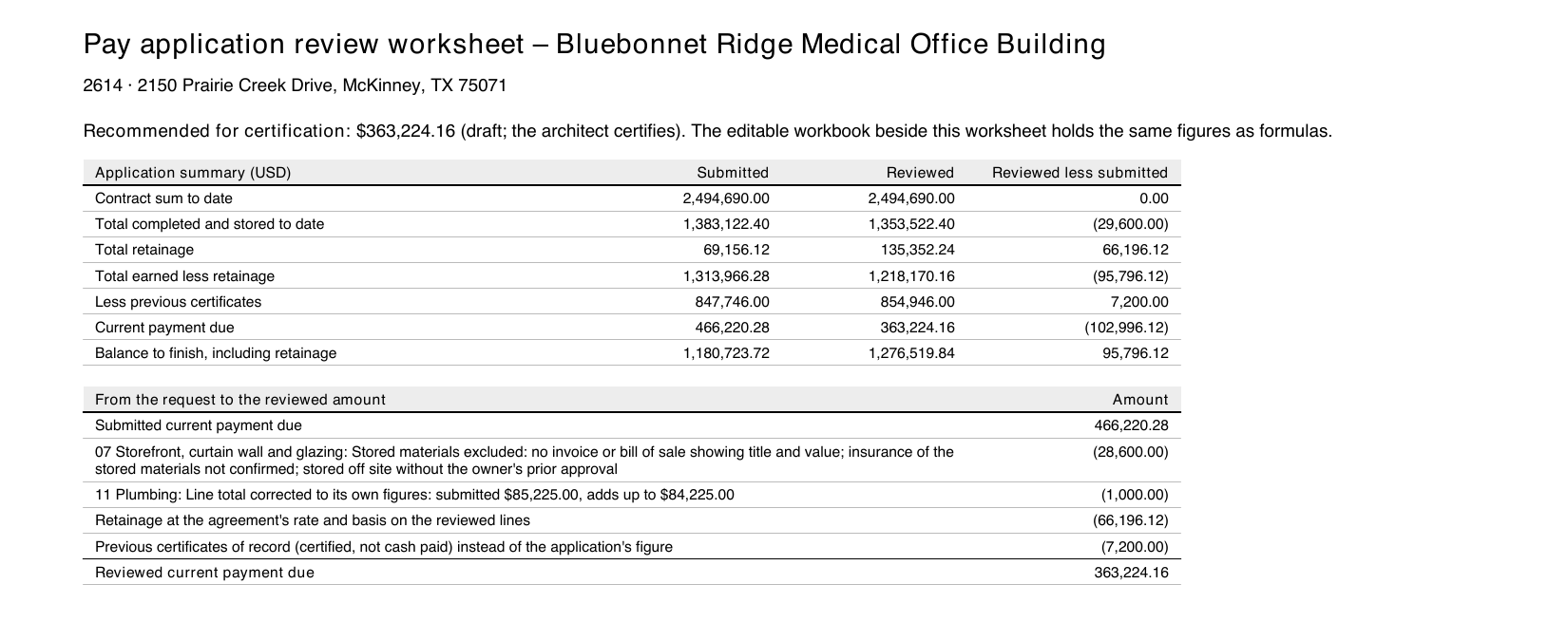
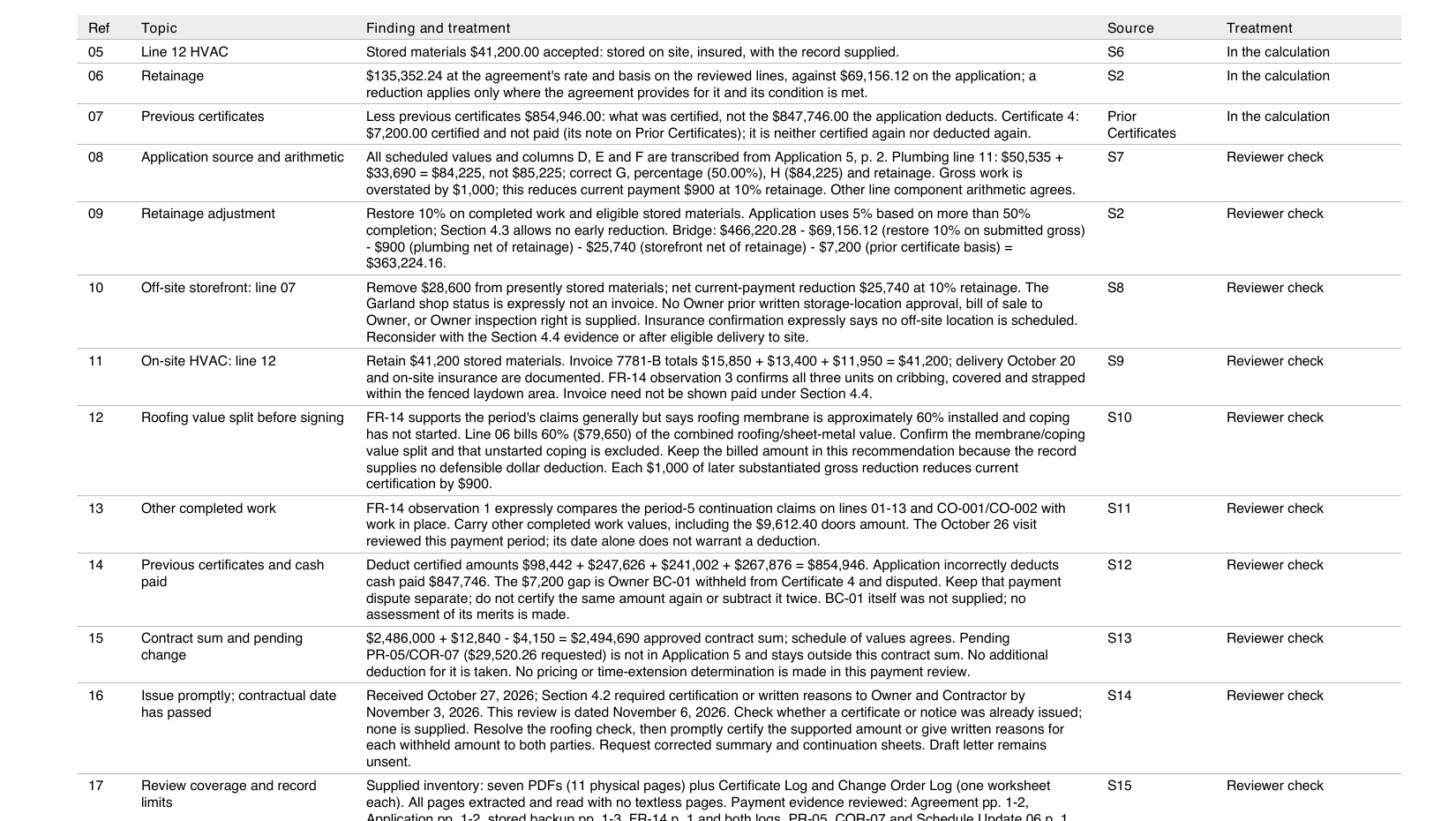
The recorded run reviewed a pay application, not a new schedule of values. On a U.S. test project with four planted errors, ArchX checked Pay Application No. 5 and its G703-style continuation sheet against the agreement, the certificate log and the field report. It found all four, among them a plumbing line whose total was off by $1,000, and saved a review worksheet with the reviewed continuation sheet, a workbook with formulas and a draft letter to the contractor, with nothing sent. It carried the $79,650 roofing claim and named one point to settle before signing: how that value splits between membrane and coping.
ArchX working time, measured
less than the contractor requested: $466,220.28 requested, $363,224.16 recommended for certification
planted errors found: off-site stored materials without evidence, retainage cut to 5% against the agreement, previous certificates taken as cash paid, and a line total off by $1,000
Test project: U.S., with planted errors. A fictitious firm, owner and contractor, a medical office building under a supplied owner-contractor agreement. One run with ChatGPT Pro (GPT 6.1 Sol, very high) and the same code as ArchX 0.1.3, sent to every firm on November 6, 2026. See the whole result
Asked briefly.
Who prepares the schedule of values?
The contractor. Under AIA A201-2017 §9.2, on a stipulated sum or GMP contract, the contractor submits it to the architect before the first application for payment. AIA does not publish a standard form for it; the G703 continuation sheet is often used to record it.
What is the difference between a schedule of values and a G703?
The schedule of values is the breakdown of the contract sum. G703 is AIA’s continuation sheet: it carries that breakdown, adds the billing columns for each application and is used together with the G702 application and certificate for payment.
Can the schedule of values change during the job?
Under A201-2017 §9.2, changes go to the architect, supported by the data the architect requires. Approved change orders come in as lines of their own; AIA’s instructions list them separately, on their own continuation sheet or at the end of the basic schedule.
What is front-loading?
Putting more value on early work than it is worth, so that payments run ahead of progress. It shows in lines such as bonds, mobilization, general conditions or foundations that are high against the bid breakdown or your estimate. If the contractor leaves the job, the owner has paid for work that is not there.
Does ArchX review pay applications against the schedule of values?
Yes. ArchX checks pay applications against the contract, and its review covers the schedule of values, retainage and overbilling. In the recorded test it reviewed Pay Application No. 5 line by line against its continuation sheet. You check the result and certify. The reviewed pay application
How long did the review take?
In the example 5 min 34 s of ArchX working time, measured, for the whole pay application review.
Is the template free?
Yes. The Excel template on this page is free to use and adapt in your firm. Its columns are our own words for the continuation-sheet logic; it is not an AIA form.
Sources, read November 16, 2026: AIA Contract Documents: What is a schedule of values and why is it required (A201-2017 §9.2) · Instructions: G703-1992, Continuation Sheet · Summary: G703-1992, Continuation Sheet · Instructions: G702-1992, Application and Certificate for Payment · Summary: A201-2017, General Conditions · Four tips to get paid quicker using AIA payment applications · How to complete the G702 and G703 · Construction general conditions costs · Retainage in construction
Try it on your own work.
Download ArchX for Mac or Windows and give it a task from your firm. 7 days free with your ChatGPT account (Plus or higher).