
Drawing register template.
Filled from the Layout Book.
What goes in a drawing register, where Archicad keeps each value, and a recorded test: ArchX filling title blocks on eight sheets, and what Archicad refused.
What goes in a drawing register?
One row per drawing: drawing number, title, paper size, scale, the revision last issued, status and the date of issue. Every row has to agree with the title block of the drawing it lists. In Archicad most of these values already exist: the layout ID and name in the Layout Book, the scale of each placed drawing, the revisions of each layout in its Revision History. Read the register from them instead of typing it twice, but take the latest revision in a closed transmittal set: by default, a new change gives a layout a new revision before the next issue.
The columns, and where Archicad keeps them
Use this as the template. The last column says where Archicad 29 holds each value, according to Graphisoft’s help.
| Column | What goes in | Where Archicad 29 keeps it |
|---|---|---|
| Drawing number | One number per drawing, kept through every revision | Layout ID in the Layout Book; Autotext “Layout ID” |
| Title | What the drawing shows | Layout name; Autotext “Layout Name” |
| Paper size | A1, A2, A3 as issued | The master layout the drawing uses |
| Scale | The scale of each drawing on the sheet | Drawing scale of the placed drawing; Autotext “Drawing Scale” |
| Revision | The revision last issued, such as P02 or C01 | Revision History in Layout Settings: the latest revision in a closed transmittal set. Autotext “Current Revision ID” may already show a newer, unissued one |
| Status | What the drawing may be used for, such as S3 or For Planning | Project Status in Project Info, or a field your template adds |
| Date | When that revision was issued | Autotext “Current Revision’s Transmittal Set Date”, once the current revision has been issued |
| Drawn and checked by | Initials | No Autotext of that name; a field your template adds |
Archicad’s Autotext list has entries for the client, but none called drawn by or checked by. In the test below, the client and the drawn-by initials were recorded in the project but appeared in neither of the template’s two master title blocks, so no drawing showed them.
Status and revision on ISO 19650 projects
Where the appointment follows BS EN ISO 19650, the status and revision columns carry the codes of the UK National Annex. The UK BIM Framework explains them in its Guidance Part C (Edition 1, September 2020), and what the 2021 National Annex changed in its Guidance Part 2 (Edition 6, February 2021):
- A status code tells the recipient what the drawing may be used for. S3 means suitable for review and comment. Since the 2021 National Annex, S4 marks information shared for review and authorisation, and the new S5 information shared for review and acceptance.
- Codes starting with A are Published status codes. The 2021 National Annex keeps authorisation and acceptance apart, and the purpose behind each A code belongs in the project’s information standard.
- A status code is not the purpose of issue, though the two are linked: information issued for construction should carry a Published status code.
- A revision code starting with P is preliminary (P01, P02). A C prefix, as in C01, marks published, contractual information.
The register ArchX saved in the test has a column for the status code. It stayed blank: the brief named the status “For Planning” but no code.
Register or issue sheet
Keep the two apart. The register lists every drawing once, with the revision last issued. The issue sheet records each issue: the date, the recipients and which revision of each drawing went out.
In Archicad, closing a transmittal set finalises the revisions of the layouts in it, and the date of the set can appear in the title block as Autotext.
How to do it.
- 01
Fill in Project Info once
Project, site, practice and client go into File › Info › Project Info. Title blocks pick them up as Autotext.
- 02
Check the title block
Open the master layout and look for a line for each value. Where there is none, as for drawn by in the test, add a labelled field.
- 03
Number the drawings
Give every layout in the Layout Book its ID. In the test one sheet had none, and ArchX asked whether to number it.
- 04
Issue the revision
Create a transmittal set and close it. With “Override Revision ID of all included Layouts”, every layout in it takes the ID of the set.
- 05
Pull the register
A Project Index in the Navigator lists your layouts by the criteria you set. Or ask ArchX: it reads every drawing and saves the register as an Excel file.
A recorded test: eight sheets, three sentences.
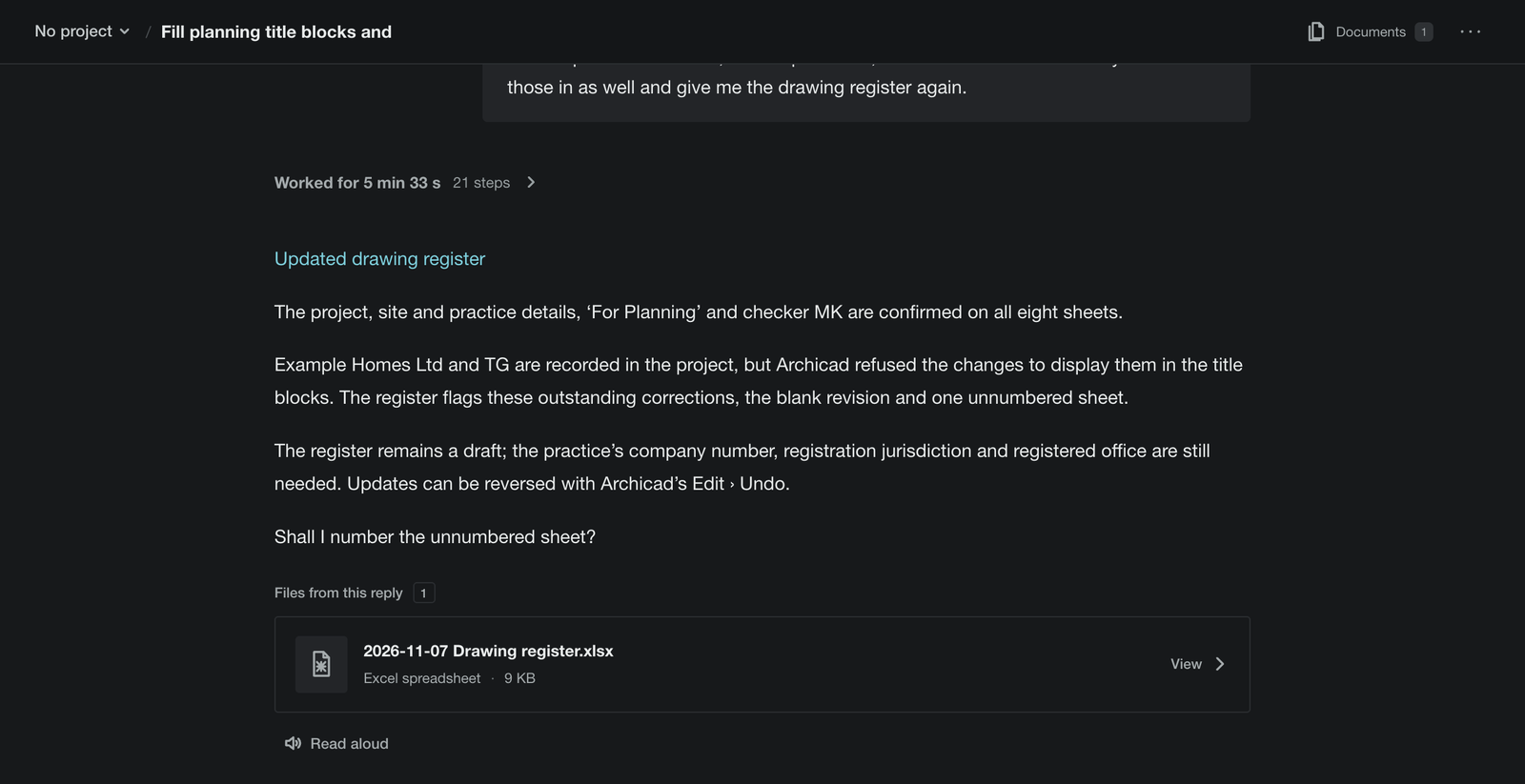
A planning set of eight sheets in Archicad 29, in British English. The first sentence gave the client, the status and drawn by, and asked for the register. The second added project, site, practice and checker. The third put everything back. Project, site, practice, status and checker reached all eight title blocks. Client and drawn by did not: the template has no line for them, Archicad refused the changes to show them, and ArchX said so.
| Sheet no. | Title | Paper | Scale | Revision | Status | Status code | Checked by |
|---|---|---|---|---|---|---|---|
| Layouts | A4 portrait | 1:1 | For Planning | MK | |||
| A.01.1 | Erdgeschoss | A2 landscape | 1:100 | For Planning | MK | ||
| A.01.2 | 1.Geschoss | A2 landscape | 1:100 | For Planning | MK | ||
| A.01.3 | 2.Geschoss | A2 landscape | 1:100 | For Planning | MK | ||
| A.02.1 | A-01 Ansicht Nord | A2 landscape | 1:100 | For Planning | MK | ||
| A.02.2 | A-02 Ansicht Ost | A2 landscape | 1:100 | For Planning | MK | ||
| A.02.3 | A-03 Ansicht Süd | A2 landscape | 1:100 | For Planning | MK | ||
| A.02.4 | A-04 Ansicht West | A2 landscape | 1:100 | For Planning | MK |
Outstanding items, as ArchX wrote them in the register:
- The client, Example Homes Ltd, is recorded in the project but does not appear in either master title block. Add a labelled client field to both masters.
- The drawn-by initials, TG, are recorded in the project but do not appear in either master title block. Add a labelled drawn-by field to both masters.
- The existing Modified by field remains blank on all eight sheets.
- The revision is blank on all eight sheets. No revision was supplied. Assign the intended revision in Archicad revision management before issue.
- The sheet titled Layouts has no sheet number and is excluded from automatic numbering. Confirm whether it belongs in the planning set.
- The revision-history object has not been checked.
- The project and site details, practice address, For Planning status and checker MK were reread in the title-block text of all eight sheets.
- This is a working register. The drawings have not been issued.
sheets with project, site, practice, status and checker, read back from the title blocks
values Archicad would not show: client and drawn by, listed in the register as outstanding
to put all eight title blocks back as they were, checked
Conversation of 7 November 2026 in the real app, with the code of ArchX 0.1.4 and ChatGPT Pro (GPT 6.1 Sol, very high), in the Swiss edition of Archicad 29 on a Mac in demo mode: an untitled project from its Basic template. Times from sending to the answer: 4 min 23 s, 5 min 35 s and 44 s. In demo mode Archicad cannot save, so the project stayed unsaved; the first sentence changed nothing because Archicad could not confirm the unsaved project, and ArchX asked before trying again. See all three answers
Asked briefly.
Can ArchX fill in title blocks in Archicad?
Yes, since ArchX 0.1.4. Say what goes in them: ArchX names the empty fields and asks for what is missing, fills them in on every drawing in the Layout Book, reads them back and saves the register as an Excel file. Its title block tools were tested in Archicad 27, 28, 29 and 30. ArchX in Archicad
Why are client and drawn by missing from the drawings?
The test template has no line for them. ArchX recorded both in the project, but Archicad refused the changes to show them in the title blocks. ArchX said so in its answer and put the fix in the register: add a labelled field for each to both master title blocks.
Does ArchX issue the revision?
No. Archicad issues a revision through a transmittal set, which you create and close in Archicad. In the test the revision stayed blank on all eight sheets, and the register said what to do: assign it in Archicad revision management before issue.
How do I undo it?
Ask. In the test one sentence put all eight title blocks back in 44 s, and ArchX checked them. ArchX also pointed to Archicad’s Edit › Undo.
Do I need Graphisoft Collaborate or Max?
No. ArchX works with your existing Archicad licence, in Archicad 28, 29 and 30 on Mac and Windows.
Sources, read 10 November 2026: Archicad 29 help: Project Indexes · Master Layouts · How to Insert Autotext · Autotext Keywords · Revision Management Workflow · Revision IDs · UK BIM Framework: Guidance Part C, Edition 1 (pp. 20 to 22) · UK BIM Framework: Guidance Part 2, Edition 6, section 3.1.10 (pp. 84 and 85)
Try it on your own work.
Download ArchX for Mac or Windows and give it a task from your practice. 7 days free with your ChatGPT account (Plus or higher).