
AI for architects.
What it does in a practice today.
Which office work AI does in a UK architecture practice today, from tenders and interim certificates to quantities and site reports, and how to start.
What can AI do in an architecture practice today?
AI now does whole pieces of office work from your own files. An agent such as ArchX by FrontierX analyses tenders, checks interim applications before you certify, takes off quantities to NRM 2, measures GIA and NIA, writes site visit reports from photos and checks enquiries against permitted development. In our recorded England test projects each task took between 4 min 03 s and 15 min 32 s of working time, and the finished files were in the project folder. A chat assistant answers questions; an agent does the work, and you check it. The design, professional judgement, the decision and the signature stay with your practice.
Task by task: what AI does today
Each row is one brief to ArchX on an England test project, with the time it worked and what came back. The right-hand column is what no agent takes off your desk.
| Task | What ArchX delivered in the test | Working time | What stays with you |
|---|---|---|---|
| Tender analysis | Three tenders for a rear extension checked against the tender rules: a comparison spreadsheet, a six-page tender report and a clarification letter to each tenderer. The lowest tender on paper, £60,800 excluding VAT, costs the clients £78,360 once the provisional sums it left out and VAT are in. | 9 min 26 s | The recommendation you sign; the client decides |
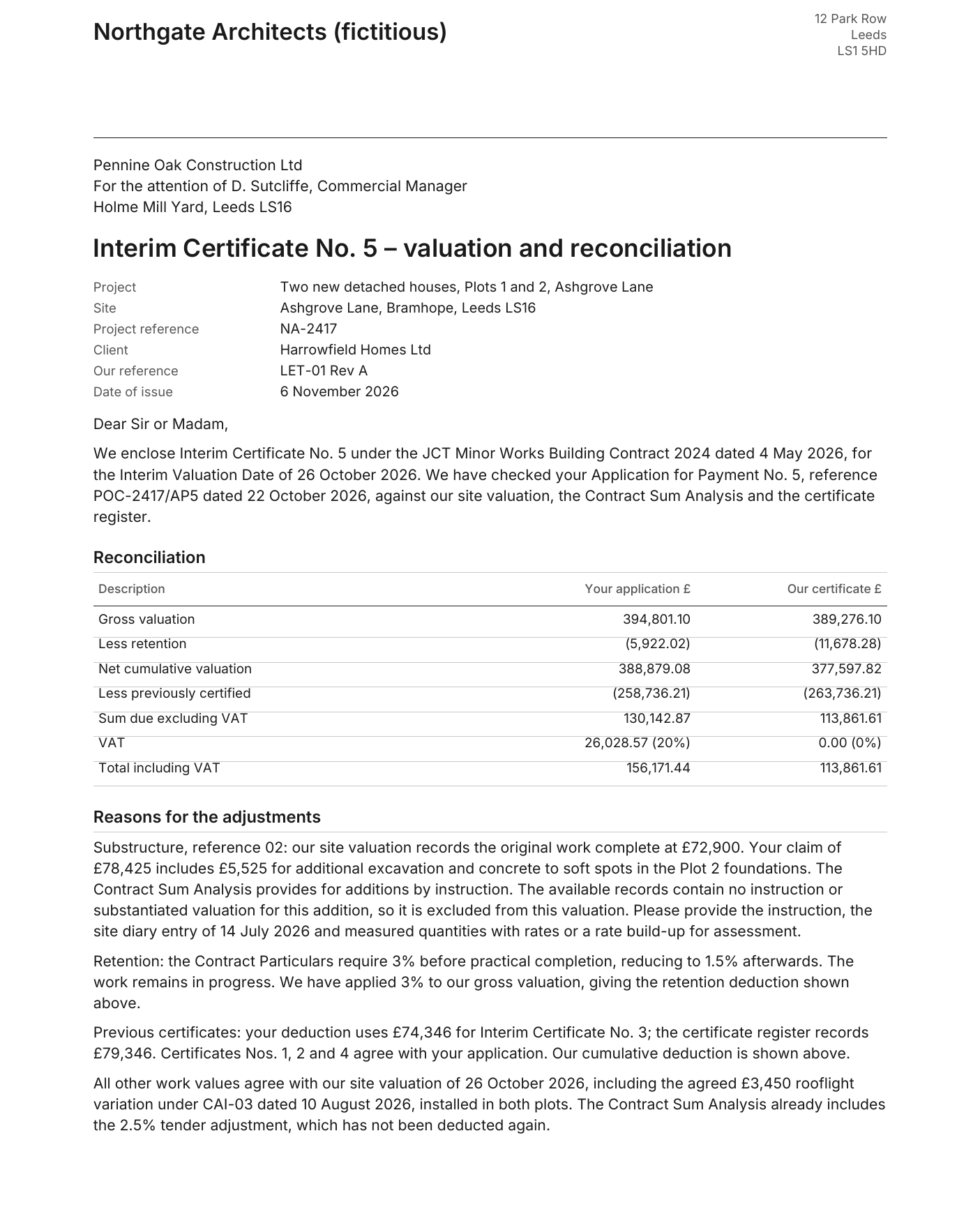
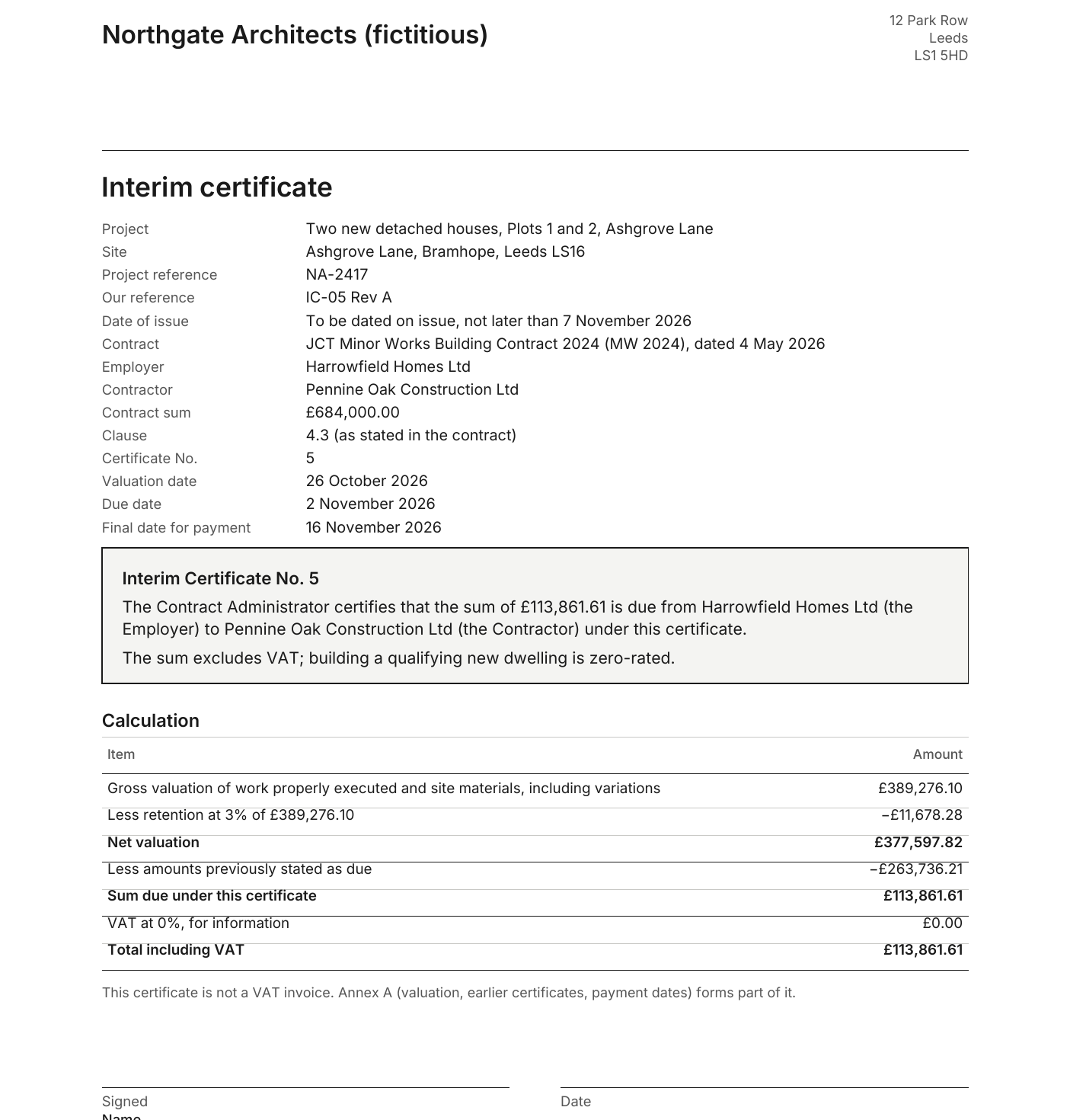
| Interim certificates | Application for Payment No. 5 under JCT Minor Works 2024 checked against the contract, the site valuation and the certificate register: 4 of 4 planted errors found, £16,281.26 less than applied for, and the certificate ready to sign. | 6 min 14 s | Certifying as contract administrator; confirming the VAT treatment |
| Bills of quantities | A bill of quantities to NRM 2 from one plan: 58 items by work section, with a column for rates. We recalculated 46 of them against the drawing, and all 46 agree. | 10 min 51 s | Provisional sums, contingency and daywork; your QS on larger jobs |
| GIA and NIA | Doors added to an existing ground floor from a DXF, then 70.55 m² GIA and 55.56 m² NIA to the RICS Code of Measuring Practice, on an A3 sheet at 1:50. | 5 min 23 s | Which areas count as usable, and the basis you give the client |
| Cost plans | A Stage 3 cost plan for a rear extension, £123,805 including VAT, with 13 rates taken from the practice’s own earlier cost plan and brought up to date. | 7 min 47 s | The rates you rely on; on larger projects the QS owns the figures |
| Drawing review | The structural engineer’s GA checked against the ground floor plan: P02 received where P03 was expected, and 9 numbered comments with our value against theirs. | 4 min 37 s | The status you give the drawing, and the engineer’s revision |
| Site visit reports | Site visit report no. 3 from eight photos of two visits: six placed, dated and described, the office camera’s time corrected, and a private picture and a photo from another site left out. | 4 min 03 s | What you saw on site, and the actions you give the contractor |
| Permitted development | Eight householder enquiries in one brief: an assessment for each with the measurement, the limit and the rule, and a summary for the practice. | 15 min 32 s | Your advice to the client; certainty comes from a lawful development certificate or the council |
| Fee proposals | A fee proposal by RIBA stage and terms of engagement from the practice’s own fee basis: £11,350 plus VAT, with the 14-day cancellation right for clients met at home. | 7 min 50 s | The fee, the terms and your signature |
Every task has its own guide or result page with the brief and the files ArchX saved. They are listed in the same order at the end of this page. The practices, clients and contractors in the tests are fictitious, and no client data was used.
What stays with your practice
An agent prepares the office work around the design: it reads, measures, compares, checks and drafts, with the source of every figure. The design, the advice to the client, professional judgement and the decision stay with the practice. So does responsibility: ArchX’s licence terms require a named, suitably qualified person in your practice to check every result before it is used, issued for tender or submitted, and to take professional responsibility for it.
Check each result as you would check the work of a new colleague: open the files, recalculate a sample and read the open points. In the recorded tests ArchX named what it could not settle itself, such as the VAT treatment of the new houses, to confirm with the client’s accountant before the interim certificate is signed, or the rooflight, scope and VAT confirmations behind the preferred tender.
Five kinds of AI tools, and where each one stops
Sort AI tools by the work they do, not by brand. Five kinds matter in a practice today. What each maker says about its own tool comes from its own pages, read on 16 November 2026. ArchX is our product and stands in the same table as the others.
| Kind | Examples | Good for | Where it stops |
|---|---|---|---|
| General assistants | ChatGPT, Claude, Gemini, Microsoft Copilot | Questions, emails, minutes, summaries of long documents, a first draft of a report | In a chat you ask, upload a document and read the answer; the rest of the work stays with you. For drawings, quantities and regulations you first explain how to measure, which rule applies and what the result should look like. |
| Image and rendering tools | AI Visualizer in Archicad and in Vectorworks | Mood images and design options from a sketch, a model view or a text prompt | An image is not a drawing: dimensions, quantities and compliance checks do not come out of it. |
| CAD makers’ own assistants | AI Assistant in Archicad (Beta), AI Assistant in Vectorworks (Preview) | Questions about the program, answered from the maker’s documentation. In Archicad 30 Collaborate and Max, Graphisoft’s assistant also queries and changes the model, each change after your approval. | Each works inside its own program. In Archicad, the work on the model needs Collaborate or Max. |
| Take-off and estimating software | Dedicated take-off and estimating programs | Measuring and counting on the drawing, then pricing, for staff who take off every week | It gives quantities and costs. The tender report, the interim certificate and the site visit report are separate work. |
| Agents that work on your files | ChatGPT Work, Claude, Codex, ArchX | Tasks with several steps: open the files, work through them, save a finished document, spreadsheet or PDF | General agents need you to supply the method, the rules and the format. ArchX comes set up for UK practice work. Every file still needs your check. |
A chat and an agent in one example. In a chat you ask what to check in an interim application and get a list. An agent gets the application, the contract particulars and your certificate register, works through every line and saves the certificate and a covering letter. You then check files instead of answers.
According to OpenAI, Work in ChatGPT carries a larger task through to a reviewable result and creates finished files; in the desktop app it can also use files on your computer where your account or workspace allows it. OpenAI includes Work and Codex in every ChatGPT plan from Free to Enterprise. Anthropic merged Cowork and chat into one Claude on 16 September 2026. According to Anthropic, Cowork in Claude works in the folders and tools you choose, and deleting anything needs your approval.
Graphisoft’s AI Visualizer is part of Archicad 30 Studio, Collaborate and Max. Vectorworks processes its AI Visualizer on the Vectorworks Cloud, with a subscription or Service Select.
ArchX is an app for Mac and Windows built on Codex. It comes with tools for drawings, IFC models and surveys and the UK edition, with RICS measurement, the Building Regulations, planning and JCT contract administration, and it saves finished Excel, Word, PDF and DXF files in the project folder. In our blind evaluation of 31 October to 1 November 2026, ArchX matched or beat Codex alone on all 14 tasks on the list and was ahead on 7. On a cost estimate and a planned-versus-actual excavation comparison, Codex alone was mostly one point ahead.
Where UK practices stand
In the RIBA AI Report 2026, 74% of the practices surveyed use AI at least occasionally, up from 59% in 2025 and 41% in 2024. Use on every or most projects went from 6% in 2024 to 31%. Over 1,100 people answered RIBA’s survey in March and April 2026; respondents chose to take part, so RIBA reads the results as a good indication, not as definitive.
Most practices in the survey have started. The next step is work that ends in a file someone checks: one real task, your own files and a result you check line by line.
Data protection in one paragraph
ArchX works on your computer and sends the content of a task directly to your AI provider, never automatically to FrontierX. Where drawings, letters or minutes contain personal data, the UK GDPR and the Data Protection Act 2018 apply: settle a business plan or an API key with the provider’s data processing terms before client documents go in, and send only what the task needs. Our guide AI and data protection in UK architecture practices sets out the rules with their sources.
How to do it.
- 01
Pick one real task
The one that costs your practice the most time this month, such as a tender analysis, an interim application or a site visit report, with the files you already have.
- 02
Use files whose answer you know
A completed job with complete files lets you compare the agent’s result with your own, line by line.
- 03
Settle the AI account
For client documents, a business plan or an API key with the provider’s data processing terms. ArchX works with a ChatGPT account, Plus or higher, or an API key from OpenAI, Anthropic, Google, Mistral or xAI.
- 04
Give the brief in your own words
Download ArchX for Mac or Windows, 7 days free. Pick the project folder and say what you need, as you would to a colleague.
- 05
Check the result and time it
Open the files, recalculate a sample and read the open points. Note how long the check took: that is your own figure for the time saved.
A recorded test: an interim application checked before certifying.
On an England test project with four planted errors, ArchX checked Application for Payment No. 5 against the JCT Minor Works contract, the site valuation record and the certificate register. Back came the certificate ready to sign, a covering letter and a workbook to recalculate, with nothing sent. The certificate matched our control calculation to the penny.
ArchX working time, measured
less than the contractor applied for, excluding VAT: £130,142.87 applied for, £113,861.61 certified. The application also charged VAT at 20%; ArchX shows 0% for new dwellings and asks you to confirm it
planted errors found: a claim without an instruction, retention at 1.5% instead of 3%, an earlier certificate entered £5,000 too low, and VAT at 20% on zero-rated new houses
Test project: England, with planted errors. A fictitious practice, “Northgate Architects (fictitious)”, a fictitious employer and contractor, two new houses under JCT Minor Works 2024. One run with ChatGPT Pro (GPT 6.1 Sol, very high) and the same code as ArchX 0.1.3, sent to every practice on 6 November 2026. See the whole result
Asked briefly.
Will AI replace architects?
No. AI takes over office work around the design: compiling, comparing, checking and drafting. The design, the advice to the client and professional judgement stay with the architect, and by law only people on the ARB register may practise under the title ‘architect’. Will AI replace architects?
What is the difference between a chat and an agent?
In a chat you ask a question and do the work yourself. An agent gets the task and the files: it opens the documents, works through every step and saves the result in the project folder, such as a tender report or an interim certificate ready to sign. What is an AI agent?
Which AI tool should a practice start with?
Start from the task, not the tool. For emails, minutes and questions, a general assistant such as ChatGPT or Claude is enough. For work that ends in a file with figures someone checks, such as a tender report or an interim certificate, you need an agent that opens your files and saves the result. ArchX is set up for that work under UK rules. ChatGPT for architects: what ArchX adds
How much time does it save?
We only give measured times. In our England test projects ArchX took 9 min 26 s to analyse three tenders and write the report, 6 min 14 s to check an interim application and prepare the certificate, and 4 min 03 s for a site visit report. What that saves your practice depends on how long the task takes you now and how long the check takes. Time one task both ways. See all results
Does ArchX work with Revit, AutoCAD or Archicad?
Yes. ArchX works with the IFC, DXF and PDF files they export, and live in the open model in Archicad 28, 29 and 30. From ArchX 0.1.13 it also works directly in Revit on Windows and in Vectorworks on Windows, with Vectorworks on Mac as a beta, depending on your edition. From ArchX 0.1.14 it also works in the open drawing in AutoCAD 2021 to 2027 on Windows. It does not open DWG files on its own: save a DXF or print a PDF. Files and software
Where do our drawings go?
Your files stay in your project folder on your computer. What a task needs goes straight to the AI provider your practice chose, with no service in between and never automatically to FrontierX. AI and data protection in the UK
What do we need to try it?
A Mac or a Windows PC and a ChatGPT account, Plus or higher, or your own API key from OpenAI, Anthropic, Google, Mistral or xAI. The 7-day free trial starts without payment details. Try free for 7 days
Sources, read 16 November 2026: RIBA AI Report 2026, page 16 and About the survey · RIBA: AI adoption reaches tipping point across UK architecture, 22 July 2026 · OpenAI: Use ChatGPT (Chat, Work, Codex) · OpenAI: Work and Codex in ChatGPT plans · Anthropic: Claude Cowork · Anthropic: Cowork and chat are now one Claude, 16 September 2026 · Graphisoft: AI solutions in Archicad · Graphisoft help: supported tools · Vectorworks: AI Assistant · Vectorworks 2027 help: generating AI images
Try it on your own work.
Download ArchX for Mac or Windows and give it a task from your practice. 7 days free with your ChatGPT account (Plus or higher).