
Interim certificates.
Application checked, certificate ready.
Check a JCT interim application line by line: work done, variations, retention, previous certificates, VAT. A test project with the certificate and letter.
How do you check a contractor’s interim application?
Value the work yourself, then compare line by line: each amount against your site valuation and the contract sum analysis, additions only with an instruction, retention at the rate in the contract particulars, earlier certificates from your own register and VAT by the nature of the work. Certify your figure, not theirs, and give the reason for each difference in a covering letter. Fix the due date, the pay less date and the final date for payment first, because they run from the valuation date.
What moves the figure
Our test application carried four planted errors of the kind that come up in practice. Check each of them:
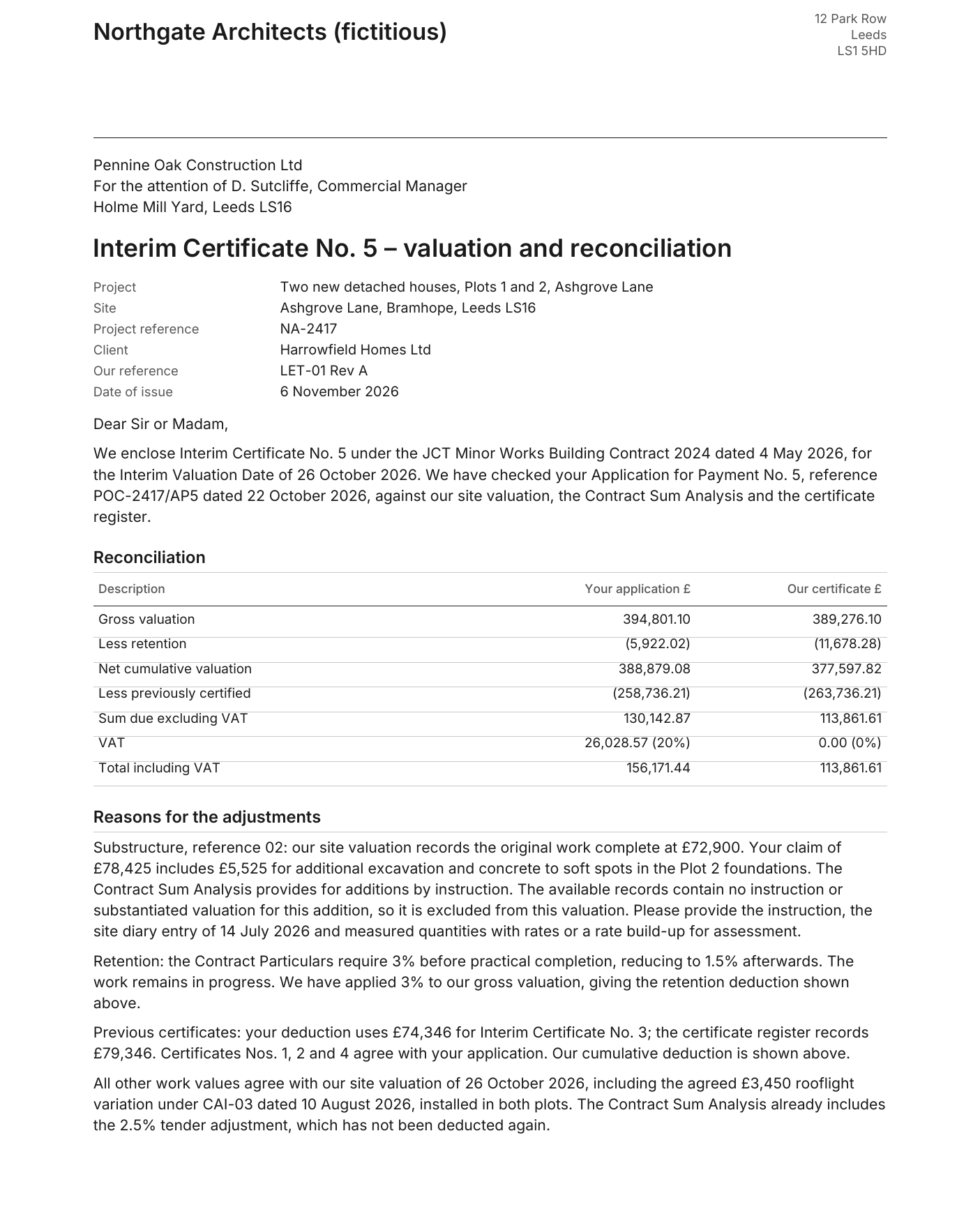
- A line above its contract value for extra work with no instruction behind it.
- Retention at the rate for after practical completion, while the work is still in progress.
- An earlier certificate entered too low, so too little is deducted as previously certified.
- VAT at the standard rate on work that may be zero-rated, such as building qualifying new dwellings.
The dates that matter
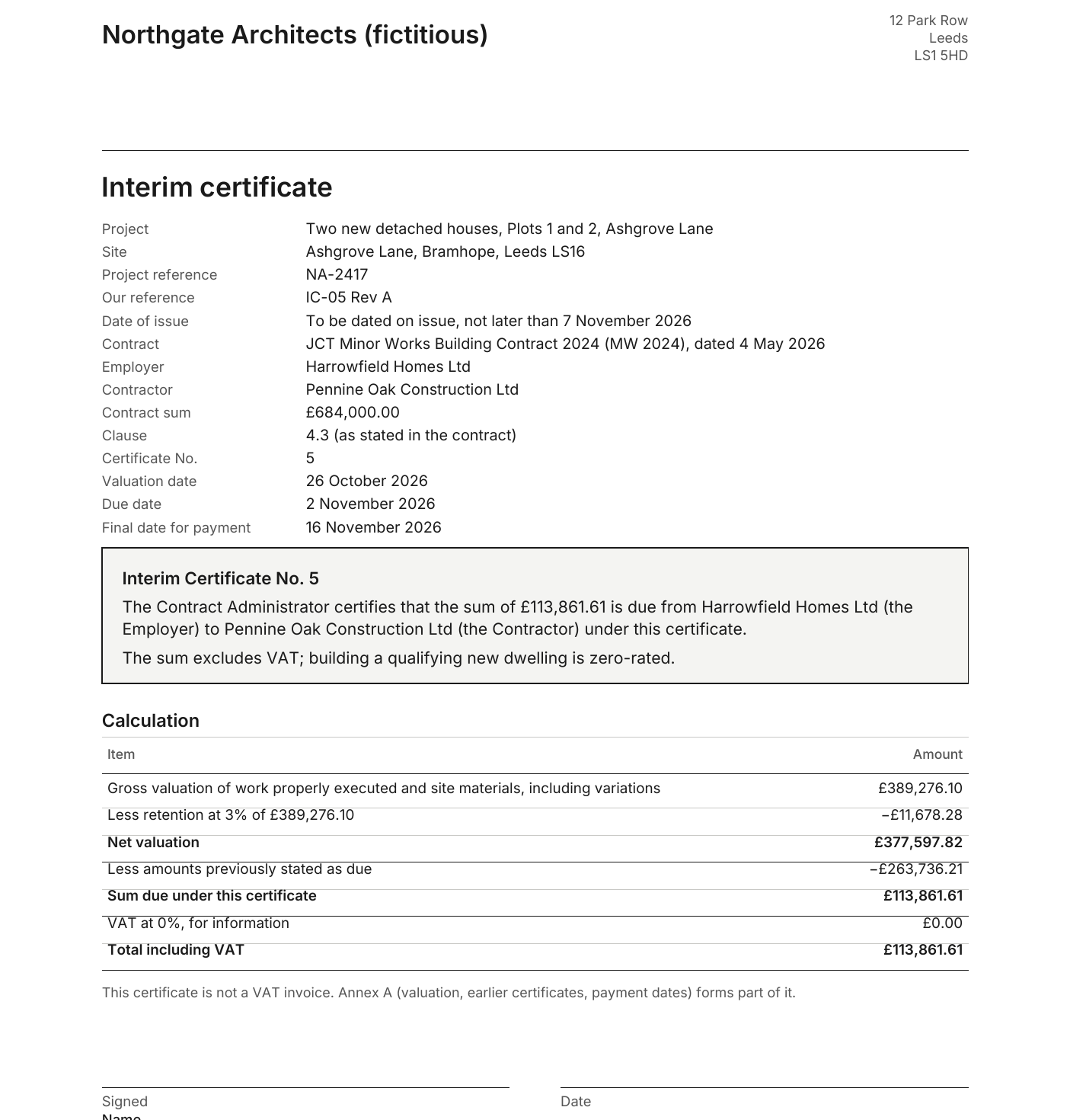
The contract particulars set them. In the test project, under JCT Minor Works 2024, the due date falls 7 days after the interim valuation date, the final date for payment 14 days after the due date, and any pay less notice must be given no later than 5 days before the final date for payment. A certificate is not a pay less notice. Check the dates against your own particulars.
How to do it.
- 01
Gather the file
The application, the contract particulars and sum analysis, your site valuation record, instructions and the certificate register.
- 02
Compare every line
Against your valuation and the contract value; additions only with an instruction.
- 03
Recalculate
Gross valuation, retention at the contract rate, previously certified, sum due.
- 04
Check VAT and dates
The VAT treatment of the work, the due date, pay less date and final date for payment.
- 05
Certificate and letter
The certificate ready to sign, and a letter explaining each difference from the application.
A test project: Application for Payment No. 5 on two new houses.
On an England test project, ArchX checked the application against the contract, the site valuation record and the certificate register, then wrote the certificate with its annex, the covering letter and a workbook to recalculate.
ArchX working time, measured
less than the contractor applied for, excluding VAT: £130,142.87 applied for, £113,861.61 certified. The application also charged VAT at 20%; ArchX shows 0% for new dwellings and asks you to confirm it
planted errors found: a claim without an instruction, retention at 1.5% instead of 3%, an earlier certificate entered £5,000 too low, and VAT at 20% on zero-rated new houses
Test project: England, with planted errors. A fictitious practice, “Northgate Architects (fictitious)”, a fictitious employer and contractor, two new houses under JCT Minor Works 2024. One run with ChatGPT Pro (GPT 6.1 Sol, very high) and the same code as ArchX 0.1.3, sent to every practice on 6 November 2026. See the whole result
Asked briefly.
Does ArchX issue the certificate?
No. ArchX prepares it for your signature and writes the letter; nothing is sent. You check it, sign it and issue it as contract administrator.
Can I recalculate the figures?
Yes. The valuation and reconciliation workbook holds the figures, and its reconciliation checks return zero in the example.
Is VAT decided for me?
No. ArchX states the treatment it applied and its basis, and tells you what to confirm. In the example it showed VAT at 0% on the assumption that both houses qualify, and asked to confirm that with the client’s accountant.
How long does it take?
In the example 6 min 14 s of ArchX working time, measured. You then check the result.
Sources, read 7 November 2026: HMRC VAT Notice 708: buildings and construction · JCT Explains: interim payments
Try it on your own work.
Download ArchX for Mac or Windows and give it a task from your practice. 7 days free with your ChatGPT account (Plus or higher).